GOV.UK — task list with explicit completion states
Functional Product UI · product UI flow
Source: pending · Classification: pending
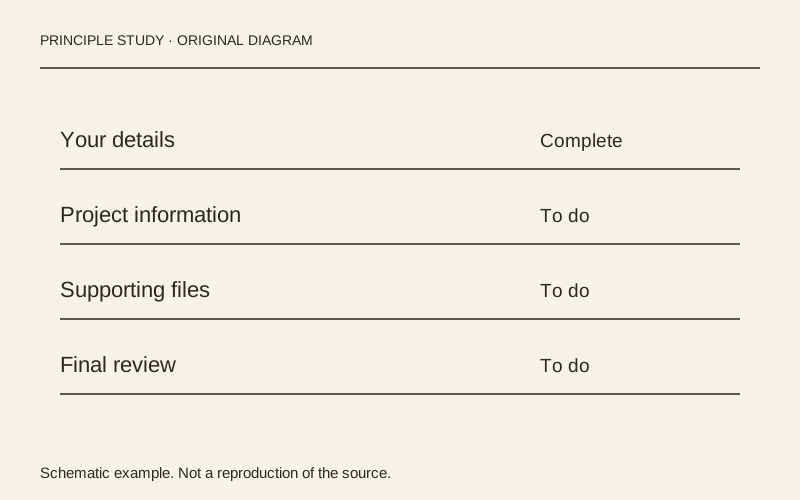
Original principle diagram · Draft explanation
Keep every task beside its status.
What to borrow: Align task links and readable status labels in a single list; place hints below their task.
When to use this principle
- When it works
- Applications and onboarding processes with several independently understandable tasks.
- When to avoid it
- Presenting blocked tasks as immediately actionable or relying on badge color alone.
Original teaching diagram with illustrative content; not a screenshot or reconstruction of the source. Trova · AI-assisted illustration. Original Trova diagram.
- Steal · grid/layoutmodel draft
The example uses ruled rows with the task link at the left and completion status at the right. Repeated alignment makes unfinished work easy to scan without a separate progress dashboard.
- Steal · component patternmodel draft
Completed is plain text while Incomplete appears on a tinted background. Both states are written out, so the difference survives loss of color.
- Steal · copywritingmodel draft
Only the financial-history task has a supporting hint, placed directly below its link. Add context where a task needs it instead of giving every row an equally long description.
Fonts: GDS Transport · Original: GOV.UK Design System
private-reference-only
View original ↗Source & usage rights
Original: GOV.UK Design System. Source verification: pending review.
Recorded rights label: private-reference-only. Original work and reproduction rights belong to their owners. A note license does not grant rights to copy a screenshot, trademark or design.
Trova notes: apply the principles in your own work, including commercial projects. Bulk republication or resale is not permitted. Usage terms.
Captured: 2026-10-10. Capture does not establish source verification.