Cal.com — pick a date and time
Functional Product UI · product UI flow
Source: pending · Classification: pending
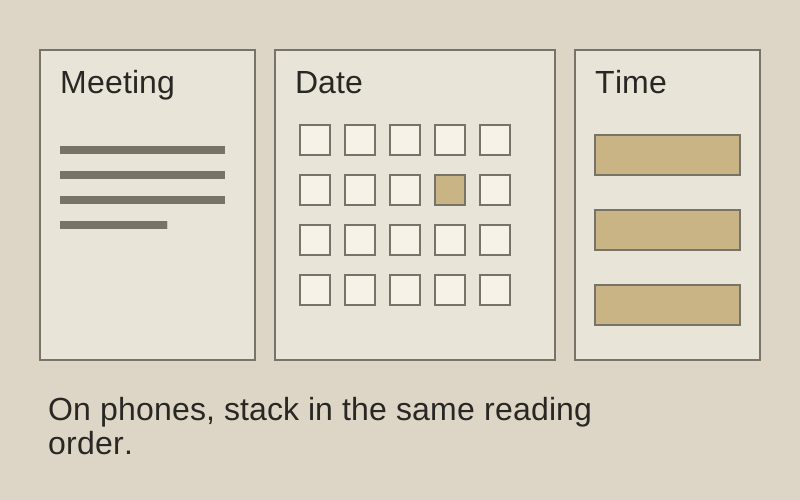
Original principle diagram · Draft explanation
Context, calendar, then time.
What to borrow: Separate meeting context, date choice, and available times.
When to use this principle
- When it works
- Scheduling with a manageable set of available slots.
- When to avoid it
- Three squeezed columns on a phone; stack these regions instead.
Original principle diagram — a model-drafted explanation, not a reconstruction of the source. Trova · AI-assisted illustration. Original Trova diagram.
- Steal · grid/layoutmodel draft
Three columns in one card: who and what (host, meeting name, length, location, time zone), the month grid, then the chosen day's slots. Date and time are one decision, not two pages.
- Steal · component patternmodel draft
The first free day is already selected and its slots already listed; available days are filled and unavailable ones are bare numbers. The visitor can choose a time immediately.
- Steal · copywritingmodel draft
A 12h/24h switch and a time-zone menu sit in the panels they affect, not in settings.
Fonts: Inter · Original: Cal.com
private-reference-only
View original ↗Source & usage rights
Original: Cal.com. Source verification: pending review.
Recorded rights label: private-reference-only. Original work and reproduction rights belong to their owners. A note license does not grant rights to copy a screenshot, trademark or design.
Trova notes: apply the principles in your own work, including commercial projects. Bulk republication or resale is not permitted. Usage terms.
Captured: 2026-10-10. Capture does not establish source verification.