Skip to the collection
Skip to references

Public vault · every note in the open

Steal this vault

201 entries, 447 steal-notes — 281 by hand, 166 model drafts. 3 results have public source URLs. Source and classification review are recorded separately on each reference.

Refine: kind, font, color, order1 active
e.g. #e4572e
Jump to results
3 references · product UI flow · onboarding flow sectionsClear search & filters

GOV.UK — check answers before submitting

Functional Product UI · product UI flow

Source: pending · Classification: pending
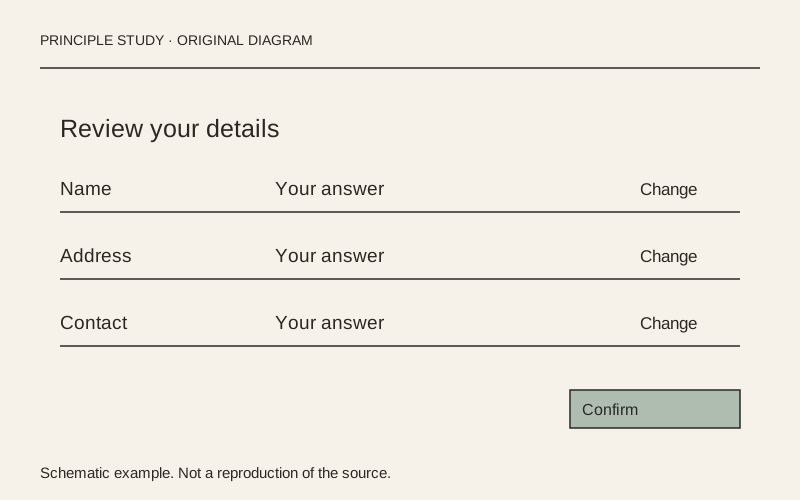
Review the answer beside its correction.

Original principle diagram · Draft explanation

Review the answer beside its correction.

What to borrow: Align each answer with a nearby change action, grouped into meaningful sections.

When to use this principle
When it works
Long forms where people need to check several answers before a final submission.
When to avoid it
Short, reversible tasks where another review screen adds unnecessary work.

Original teaching diagram with illustrative content; not a screenshot or reconstruction of the source. Trova · AI-assisted illustration. Original Trova diagram.

  • Steal · grid/layoutmodel draft

    The example groups personal and application details into separate summary lists. Each row places a label, its answer and a Change link on the same line; use this alignment to make corrections local to the answer.

Fonts: GDS Transport · Original: GOV.UK Design System

private-reference-only

View original ↗
Source & usage rights

Original: GOV.UK Design System. Source verification: pending review.

Recorded rights label: private-reference-only. Original work and reproduction rights belong to their owners. A note license does not grant rights to copy a screenshot, trademark or design.

Trova notes: apply the principles in your own work, including commercial projects. Bulk republication or resale is not permitted. Usage terms.

Captured: 2026-10-10. Capture does not establish source verification.
GOV.UK — error summary with recovery links

Functional Product UI · product UI flow

Source: pending · Classification: pending

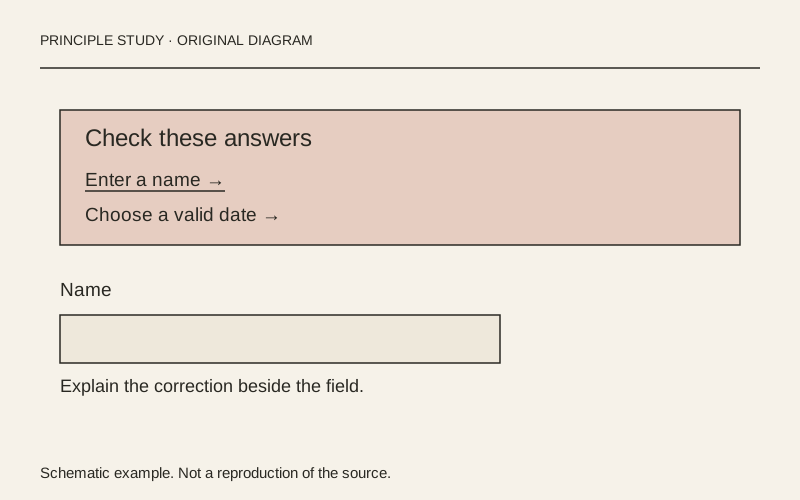
Turn an error list into a recovery route.

Original principle diagram · Draft explanation

Turn an error list into a recovery route.

What to borrow: Put a concise error summary before the form and identify each correction with a link.

When to use this principle
When it works
Forms with multiple fields whose errors may be outside the current viewport.
When to avoid it
A generic alert that replaces field-level explanations or uses color as its only signal.

Original teaching diagram with illustrative content; not a screenshot or reconstruction of the source. Trova · AI-assisted illustration. Original Trova diagram.

  • Steal · component patternmodel draft

    The example separates a problem heading from two underlined error links inside one prominent boundary. Make the list an index of corrections, not just a notice that submission failed.

Fonts: GDS Transport · Original: GOV.UK Design System

private-reference-only

View original ↗
Source & usage rights

Original: GOV.UK Design System. Source verification: pending review.

Recorded rights label: private-reference-only. Original work and reproduction rights belong to their owners. A note license does not grant rights to copy a screenshot, trademark or design.

Trova notes: apply the principles in your own work, including commercial projects. Bulk republication or resale is not permitted. Usage terms.

Captured: 2026-10-10. Capture does not establish source verification.
GOV.UK — task list with explicit completion states

Functional Product UI · product UI flow

Source: pending · Classification: pending

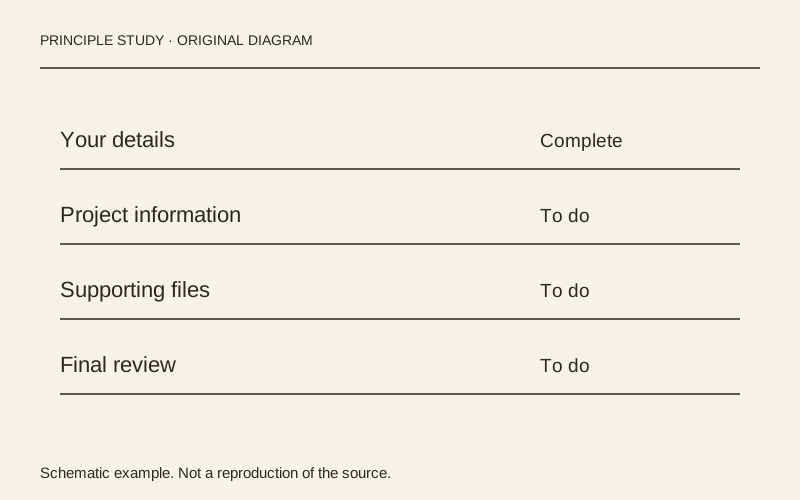
Keep every task beside its status.

Original principle diagram · Draft explanation

Keep every task beside its status.

What to borrow: Align task links and readable status labels in a single list; place hints below their task.

When to use this principle
When it works
Applications and onboarding processes with several independently understandable tasks.
When to avoid it
Presenting blocked tasks as immediately actionable or relying on badge color alone.

Original teaching diagram with illustrative content; not a screenshot or reconstruction of the source. Trova · AI-assisted illustration. Original Trova diagram.

  • Steal · grid/layoutmodel draft

    The example uses ruled rows with the task link at the left and completion status at the right. Repeated alignment makes unfinished work easy to scan without a separate progress dashboard.

Fonts: GDS Transport · Original: GOV.UK Design System

private-reference-only

View original ↗
Source & usage rights

Original: GOV.UK Design System. Source verification: pending review.

Recorded rights label: private-reference-only. Original work and reproduction rights belong to their owners. A note license does not grant rights to copy a screenshot, trademark or design.

Trova notes: apply the principles in your own work, including commercial projects. Bulk republication or resale is not permitted. Usage terms.

Captured: 2026-10-10. Capture does not establish source verification.

Read the editorial record

Provenance & takedown

Publicly sourced references link to an original; private or concept examples are labelled separately. All referenced work belongs to its creators. What this vault adds — and what it is for — is the commentary: the steal-notes are the content, not the pixels. Notes are written by hand unless their card says otherwise; a model draft is always labelled. Study use only.

Made something shown here and want it removed? Email hello@trova.design with the entry title or a link to this page — it comes down promptly, no questions asked.

Try it in your agent · no key

One command puts these notes inside Claude Code. Without a key the agent sees 5 families and gets 5 calls a day — enough to judge the taste before you rent it. The key opens every family and lifts the meter.

claude mcp add --transport http trova https://trova.design/api/mcp