GOV.UK — error summary with recovery links
Functional Product UI · product UI flow
Source: pending · Classification: pending
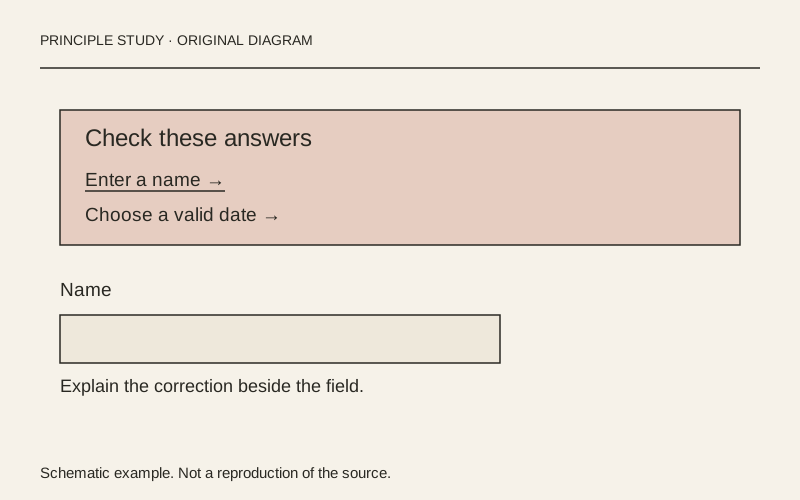
Original principle diagram · Draft explanation
Turn an error list into a recovery route.
What to borrow: Put a concise error summary before the form and identify each correction with a link.
When to use this principle
- When it works
- Forms with multiple fields whose errors may be outside the current viewport.
- When to avoid it
- A generic alert that replaces field-level explanations or uses color as its only signal.
Original teaching diagram with illustrative content; not a screenshot or reconstruction of the source. Trova · AI-assisted illustration. Original Trova diagram.
- Steal · component patternmodel draft
The example separates a problem heading from two underlined error links inside one prominent boundary. Make the list an index of corrections, not just a notice that submission failed.
- Steal · copywritingmodel draft
One error asks for a missing name; the other states a date constraint. Write the correction or valid condition in the error itself instead of exposing a technical validation code.
- Steal · grid/layoutmodel draft
The documentation recommends both an error summary and messages next to the affected answers. Use the summary for orientation and the local message while editing; the standalone capture shows only the summary.
Fonts: GDS Transport · Original: GOV.UK Design System
private-reference-only
View original ↗Source & usage rights
Original: GOV.UK Design System. Source verification: pending review.
Recorded rights label: private-reference-only. Original work and reproduction rights belong to their owners. A note license does not grant rights to copy a screenshot, trademark or design.
Trova notes: apply the principles in your own work, including commercial projects. Bulk republication or resale is not permitted. Usage terms.
Captured: 2026-10-10. Capture does not establish source verification.