Skip to the collection
Skip to references

Public vault · every note in the open

Steal this vault

201 entries, 447 steal-notes — 281 by hand, 166 model drafts. 2 results have public source URLs. Source and classification review are recorded separately on each reference.

Refine: kind, font, color, order
e.g. #e4572e
Jump to results
2 references tagged “navigation”Clear search & filters

shadcn/ui — dashboard navigation and reporting regions

Functional Product UI · product UI flow

Source: pending · Classification: pending
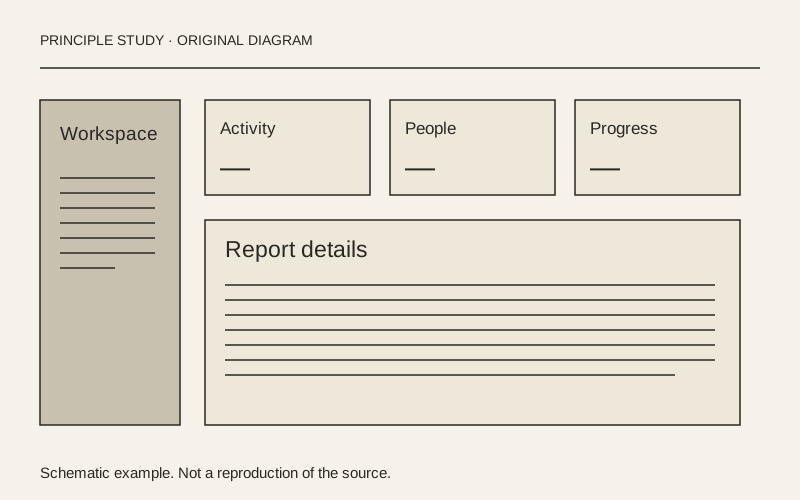
Separate navigation, summary and investigation.

Original principle diagram · Draft explanation

Separate navigation, summary and investigation.

What to borrow: Keep persistent navigation outside the reporting area, with summary metrics above a larger chart.

When to use this principle
When it works
Operational dashboards where people alternate between a quick overview and a more detailed report.
When to avoid it
Filling the first screen with metrics that have no relationship to the user's next decision.

Original teaching diagram with illustrative content; not a screenshot or reconstruction of the source. Trova · AI-assisted illustration. Original Trova diagram.

  • Steal · grid/layoutmodel draft

    Inside the dashboard example, a narrow navigation column sits beside a broad report region. Four summary cards share a row, while a larger visitor chart spans the area beneath them.

Fonts: Geist · Original: shadcn/ui

private-reference-only

View original ↗
Source & usage rights

Original: shadcn/ui. Source verification: pending review.

Recorded rights label: private-reference-only. Original work and reproduction rights belong to their owners. A note license does not grant rights to copy a screenshot, trademark or design.

Trova notes: apply the principles in your own work, including commercial projects. Bulk republication or resale is not permitted. Usage terms.

Captured: 2026-10-10. Capture does not establish source verification.
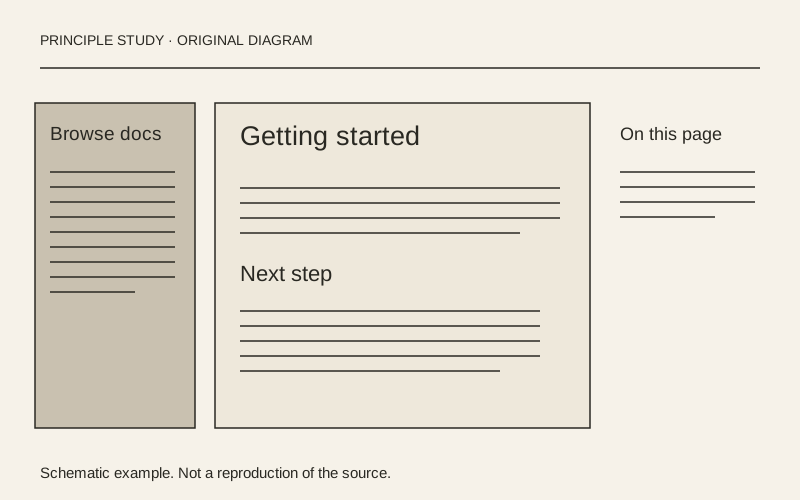
Resend — documentation with three levels of navigation

Functional Product UI · editorial

Source: pending · Classification: pending

Give each navigation level its own place.

Original principle diagram · Draft explanation

Give each navigation level its own place.

What to borrow: Separate global sections, document navigation and the current page's contents around a readable main column.

When to use this principle
When it works
Documentation with a large hierarchy and articles that contain several sections.
When to avoid it
Squeezing three columns onto a phone or adding a contents list to a very short page.

Original teaching diagram with illustrative content; not a screenshot or reconstruction of the source. Trova · AI-assisted illustration. Original Trova diagram.

  • Steal · grid/layoutmodel draft

    The captured page has global documentation sections across the top, grouped document links on the left, the article in the center and an On this page list on the right. Each region answers a different navigation question.

Fonts: Inter · Original: Resend

private-reference-only

View original ↗
Source & usage rights

Original: Resend. Source verification: pending review.

Recorded rights label: private-reference-only. Original work and reproduction rights belong to their owners. A note license does not grant rights to copy a screenshot, trademark or design.

Trova notes: apply the principles in your own work, including commercial projects. Bulk republication or resale is not permitted. Usage terms.

Captured: 2026-10-10. Capture does not establish source verification.

Read the editorial record

Provenance & takedown

Publicly sourced references link to an original; private or concept examples are labelled separately. All referenced work belongs to its creators. What this vault adds — and what it is for — is the commentary: the steal-notes are the content, not the pixels. Notes are written by hand unless their card says otherwise; a model draft is always labelled. Study use only.

Made something shown here and want it removed? Email hello@trova.design with the entry title or a link to this page — it comes down promptly, no questions asked.

Try it in your agent · no key

One command puts these notes inside Claude Code. Without a key the agent sees 5 families and gets 5 calls a day — enough to judge the taste before you rent it. The key opens every family and lifts the meter.

claude mcp add --transport http trova https://trova.design/api/mcp