Radix Themes — controls beside component specimens
Functional Product UI · product UI flow
Source: pending · Classification: pending
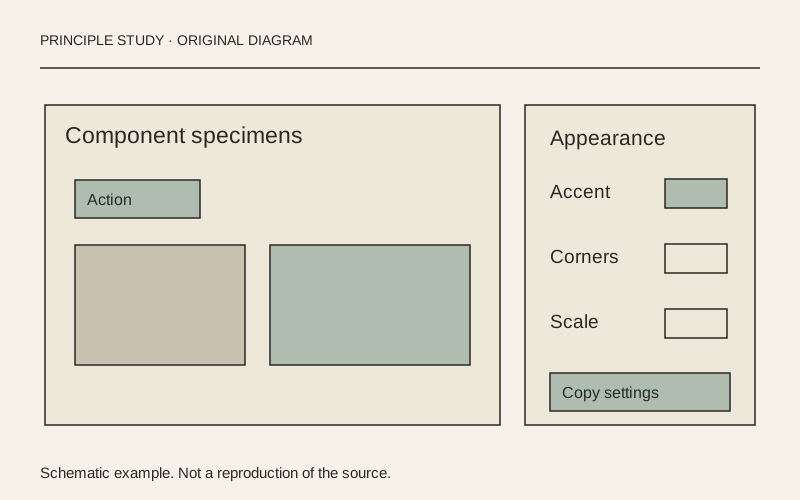
Original principle diagram · Draft explanation
Keep settings beside representative examples.
What to borrow: Pair a compact settings panel with several specimens that expose the consequences of a design choice.
When to use this principle
- When it works
- Theme editors, configuration tools and component libraries with meaningful visual alternatives.
- When to avoid it
- Showing only a decorative swatch when a setting affects text, focus or control readability.
Original teaching diagram with illustrative content; not a screenshot or reconstruction of the source. Trova · AI-assisted illustration. Original Trova diagram.
- Steal · grid/layoutmodel draft
The captured playground gives component specimens the broad left region and theme settings a narrow right panel. This separates the object being evaluated from the controls used to configure it.
- Steal · component patternmodel draft
Radius choices are illustrated with corner shapes, while scale choices use percentages. Give each setting a representation that matches what changes rather than forcing every option into identical text labels.
- Steal · colormodel draft
The selected accent and gray swatches have visible rings, and the appearance control also uses text labels. Show selected state with shape or borders as well as the chosen color.
Fonts: untitledSans, -apple-system · Original: Radix / WorkOS
private-reference-only
View original ↗Source & usage rights
Original: Radix / WorkOS. Source verification: pending review.
Recorded rights label: private-reference-only. Original work and reproduction rights belong to their owners. A note license does not grant rights to copy a screenshot, trademark or design.
Trova notes: apply the principles in your own work, including commercial projects. Bulk republication or resale is not permitted. Usage terms.
Captured: 2026-10-10. Capture does not establish source verification.