Figma Slides — product explanation with an editor preview
Playful / Toy-like · landing page
Source: pending · Classification: pending
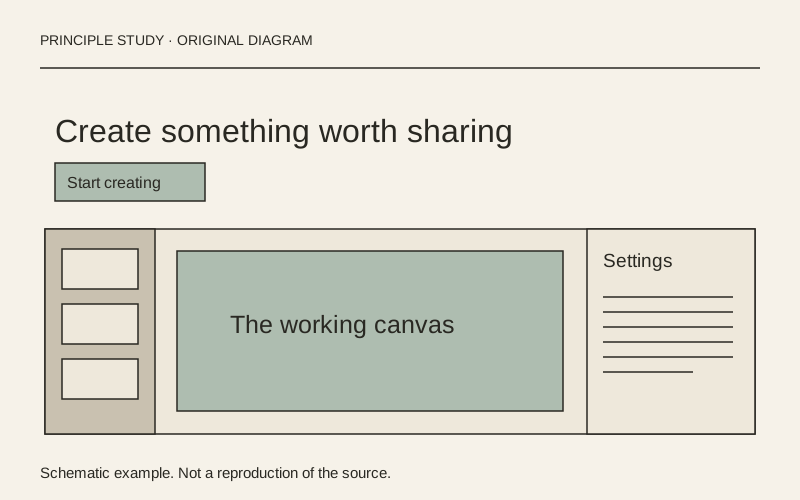
Original principle diagram · Draft explanation
Show the working context around the result.
What to borrow: Show the output inside its editor, including the tools and context that make the product understandable.
When to use this principle
- When it works
- Creative tools where the workflow is part of the value, not just the final image.
- When to avoid it
- A miniature interface whose labels become unreadable or imply features your product does not have.
Original teaching diagram with illustrative content; not a screenshot or reconstruction of the source. Trova · AI-assisted illustration. Original Trova diagram.
- Steal · grid/layoutmodel draft
The product name, explanation and two actions sit above a broad editor preview. The preview includes a slide rail, central canvas and settings region, so the visitor sees the working environment around the slide.
- Steal · colormodel draft
Bright geometric artwork occupies the right side of the hero while the main text and actions remain black on white. Concentrate expressive color where it can support the composition without weakening the copy.
- Steal · component patternmodel draft
The primary action uses a solid dark fill and the sales action uses an outline. Distinguish self-serve and contact routes without making them identical competing buttons.
Fonts: figmaSans, figmaMono · Original: Figma
private-reference-only
View original ↗Source & usage rights
Original: Figma. Source verification: pending review.
Recorded rights label: private-reference-only. Original work and reproduction rights belong to their owners. A note license does not grant rights to copy a screenshot, trademark or design.
Trova notes: apply the principles in your own work, including commercial projects. Bulk republication or resale is not permitted. Usage terms.
Captured: 2026-10-10. Capture does not establish source verification.